
Aircraft ADF1.2 - Google Play
You'll be able to see results in few seconds.
Publisher Description
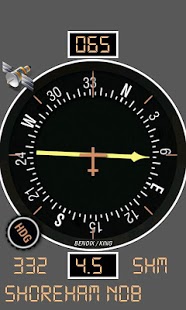
Aircraft ADF provides you with a GPS based aircraft radio magnetic indicator (RMI) instrument shown as a typical Bendix/King KI-227 instrument.
It lets you 'tune' aircraft navigation non-directional beacons (NDB) and gives you bearing and distance information to that NDB.
It uses a worldwide navigation database (downloaded on first use) and is not restricted by radio range.
It uses your device GPS position and heading to calculate bearing and distance to the tuned NDB.
Features:
- Bendix/King KI-227 face
- Worldwide NDB navigation database (downloaded on firt use)
- Digital Bearing and distance to station indications
- Option to operate as rotable compass card (just rotate with your finger!)
- Filtered and smoothed display - no jitter or jumping!
- Support for portrait and landscape screens
- Support for multiple screen resolutions
Usage
IMPORTANT POINT 1 - Please ensure you have an active data connection when starting the app for the first time as it will attempt to download the radio navigation database.
IMPORTANT POINT 2- To function correctly, the application requires not only a GPS position fix but also a valid GPS groundtrack. It may be necessary to move your device to give the GPS the data it requires to make this calculation.
Don't use it until you know its working!
Until a GPS fix is obtained, or in case of GPS fix being lost, the ADF will 'park' itself at 90 degrees and '---' will be shown in both the bearing and distance text boxes.
Tuning a station
Use the app menu to select 'Tune NDB'. You will be presented with all the NDB stations within 200 nautical miles of your current location. Selecting a NDB will tune it up. Hit your devices 'Back' button when you have selected your desired VOR.
Interpreting the display
If you have a valid GPS fix, the bearing to the NDB will be shown by the ADF needle and the top (or left in landscape mode) digital text box will show a digital bearing indication - the course you need to fly to travel towards the beacon. The distance in nautical miles to the NDB will be shown in the bottom (or right in landscape mode) digital text box.
Rotatable compass card
By default, the ADF compass card will slave itself to the GPS groundtrack, making the instrument a true single-needle Radio Magnetic Indicator(RMI). However, you can manually turn the ADF into a rotatable compass card instrument using the toggle option in the app menu. Once toggled, you can easily rotate the card using your finger.
If you like this app, please try my other aircraft/flying related apps!
I'm a professional software engineer, part-time android developer and passionate private pilot so would love to hear your thoughts, feature requests and bug reports
About Aircraft ADF
The company that develops Aircraft ADF is Sensorworks. The latest version released by its developer is 1.2.
To install Aircraft ADF on your Android device, just click the green Continue To App button above to start the installation process. The app is listed on our website since 2013-01-26 and was downloaded 0 times. We have already checked if the download link is safe, however for your own protection we recommend that you scan the downloaded app with your antivirus. Your antivirus may detect the Aircraft ADF as malware as malware if the download link to com.sensorworks.aircraftadf is broken.
How to install Aircraft ADF on your Android device:
- Click on the Continue To App button on our website. This will redirect you to Google Play.
- Once the Aircraft ADF is shown in the Google Play listing of your Android device, you can start its download and installation. Tap on the Install button located below the search bar and to the right of the app icon.
- A pop-up window with the permissions required by Aircraft ADF will be shown. Click on Accept to continue the process.
- Aircraft ADF will be downloaded onto your device, displaying a progress. Once the download completes, the installation will start and you'll get a notification after the installation is finished.
Program Details
System requirements
Download information
Pricing
Version History
version 1.2
posted on 2013-01-26
- Changed mag var calculation to use the NOAA WMM 2010 calculation rather than the Google internal
version 1.2
posted on 2013-01-26
Several fixes and updates
Disclaimer
Official Google Play Link
We do not host Aircraft ADF on our servers. We did not scan it for viruses, adware, spyware or other type of malware. This app is hosted by Google and passed their terms and conditions to be listed there. We recommend caution when installing it.
The Google Play link for Aircraft ADF is provided to you by apps112.com without any warranties, representations or guarantees of any kind, so access it at your own risk.
If you have questions regarding this particular app contact the publisher directly. For questions about the functionalities of apps112.com contact us.
